
Guide · API security
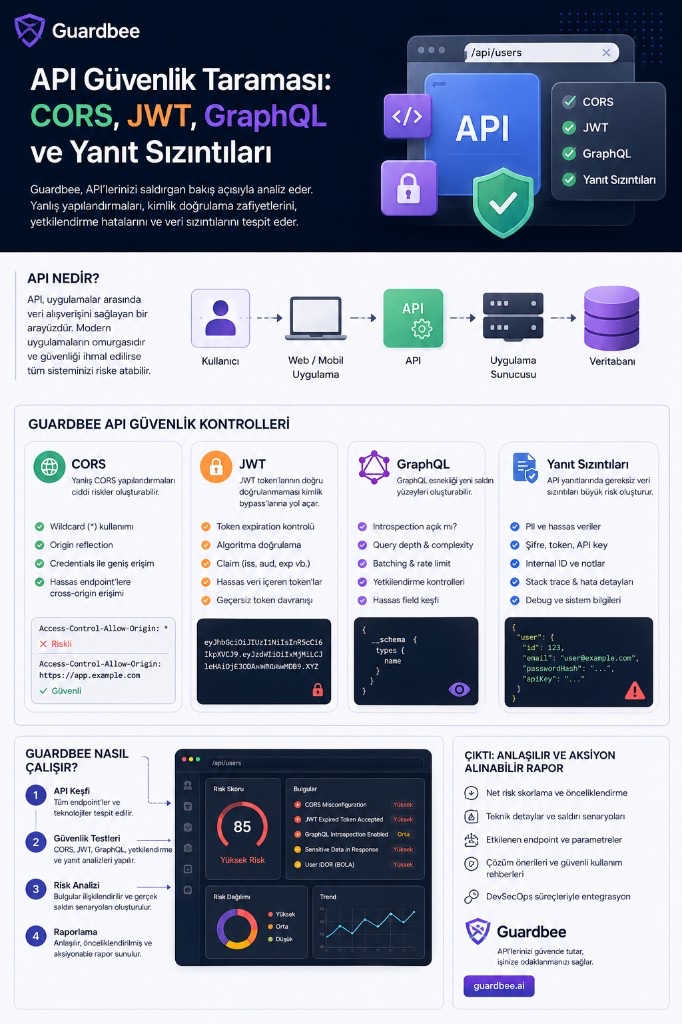
Most modern web applications run through APIs. Login, profile data, payments, orders, and a large share of business logic all pass through the API layer.
That makes APIs a high-value target for attackers. OWASP’s API Security Top 10 highlights authentication and authorization failures along with data leakage, security misconfiguration, resource consumption, and SSRF-style API-specific risks.
So how do you know whether an API is actually secure?
Guardbee’s API security scan does not only check whether endpoints are reachable. It analyzes how the API behaves, what information it exposes, and how much access different request scenarios unlock.
In this guide we focus on four areas:
- CORS
- JWT and authentication
- GraphQL
- API response / data leakage
Why API security is different
When you visit a website, the UI you see is only the visible part of the application.
A simplified architecture:
Browser
   │
   ▼
Frontend
   │
   ▼
API
   │
   ├── Authentication
   ├── Authorization
   ├── Business Logic
   └── Data
        │
        ▼
    Database
Hiding a button in the frontend does not mean the API blocks that action.
For example, the frontend may send:
GET /api/users/123An attacker can change the request to:
GET /api/users/124If the server also returns user 124’s data, the problem is not in the frontend—it is in the API’s authorization layer.
That is why “does the endpoint work?” is not enough for API security testing.
1. CORS security checks
CORS defines the conditions under which a browser may make API requests across different origins.
For example:
https://app.example.com
          │
          ▼
https://api.example.com
The API may return:
Access-Control-Allow-Origin: https://app.example.comIn that case the API allows a specific origin. A broader policy is also possible:
Access-Control-Allow-Origin: *Important: wildcard CORS is not always a vulnerability by itself.
For a public API that is meant to be widely consumed, this configuration can be intentional. Risk depends on how the CORS policy combines with authentication and sensitive data.
OWASP also recommends configuring CORS specifically and in line with the API’s intended use. Misconfigured CORS can become an API security misconfiguration issue.
How Guardbee analyzes it
Guardbee inspects API responses and analyzes headers such as:
Access-Control-Allow-OriginAccess-Control-Allow-CredentialsAccess-Control-Allow-MethodsAccess-Control-Allow-Headers
It can then send controlled requests with different Origin values and compare server behavior. For example:
Origin: https://example.com

Origin: https://attacker.example
Do the results differ? Does the server accept an attacker-supplied Origin? Are credentials allowed?
By evaluating these signals together, Guardbee can produce a more meaningful risk analysis than a header-only check.
2. JWT security
JWT is a common token format for carrying user identity in APIs. For example:
Authorization: Bearer <JWT>A JWT generally has three parts: Header.Payload.Signature.
The payload may contain fields like:
{
  "sub": "123",
  "role": "user",
  "exp": 1780000000
}
Using JWT does not automatically mean authentication is secure. The API must validate the token correctly.
Token expiration
If the API still accepts a token after its exp value has passed, there may be a problem in the authentication mechanism. Guardbee can send a controlled request with an expired token and observe server behavior.
Algorithm validation
The algorithm declared in the JWT header must be validated securely on the server. For example:
{
  "alg": "RS256"
}
If a token is created this way, the backend should accept only expected algorithms. Guardbee focuses not only on decoding the JWT, but on server-side validation behavior.
Claim validation
Claims such as iss, aud, exp, nbf, and sub can matter depending on the application’s authentication model. If the server expects a specific audience, acceptance of a token with a different audience should be checked.
Sensitive data inside JWTs
JWT payloads are often readable by the client. Putting sensitive information like this into a token can create risk:
{
  "userId": 123,
  "email": "user@example.com",
  "role": "admin",
  "apiKey": "..."
}
In response and token analysis, Guardbee can detect secrets, API keys, tokens, and similar sensitive fields and report them as distinct security findings.
3. GraphQL security
GraphQL is a different API approach from REST. REST often exposes multiple endpoints:
GET /users
GET /users/123
GET /orders
GET /products
With GraphQL there is often a single central endpoint:
POST /graphqlThe client specifies the fields it needs inside the query:
query {
  user {
    id
    name
    email
  }
}
That flexibility is powerful for developers, but it also creates risks that need separate security evaluation.
GraphQL introspection
GraphQL introspection can reveal schema structure. For example:
{
  __schema {
    types {
      name
    }
  }
}
This can expose queries, mutations, types, fields, and arguments to an attacker.
OWASP recommends limiting introspection and GraphiQL access for production or publicly reachable GraphQL APIs according to need.
How Guardbee checks it
When Guardbee discovers a GraphQL endpoint, it tests whether introspection queries are allowed:
/graphql
     │
     ▼
Introspection Request
     │
     ├── Allowed
     └── Blocked
The result is reported with the API’s public/internal context. Open introspection is not always a critical vulnerability by itself. Conscious schema discovery on a public API is not the same risk as exposing an internal API’s full schema to anonymous users.
4. GraphQL query depth and resource abuse
One of GraphQL’s key features is nested queries. For example:
query {
  user {
    posts {
      author {
        posts {
          author {
            posts {
              title
            }
          }
        }
      }
    }
  }
}
Very deep or expensive queries can create unnecessary CPU, memory, and database load if left unchecked.
OWASP’s GraphQL guidance therefore recommends controls such as query depth, amount, complexity, timeout, and rate limiting.
On GraphQL endpoints, Guardbee can analyze query depth, response size, nested object behavior, batch request behavior, error responses, and rate/resource abuse signals to assess how open the API is to abuse.
5. API response data leakage
One of the most commonly overlooked API issues is returning more data than necessary.
The frontend may only use:
{
  "name": "Ahmet",
  "email": "ahmet@example.com"
}
While the API returns:
{
  "id": 123,
  "name": "Ahmet",
  "email": "ahmet@example.com",
  "passwordHash": "...",
  "internalUserId": 84721,
  "resetToken": "...",
  "role": "admin",
  "internalNotes": "..."
}
Even if the frontend does not render those fields, the data has already reached the browser. “It is not visible in the UI” does not mean it is secure.
OWASP API Security Top 10 2023 covers this under broken object property level authorization.
How Guardbee response analysis works
Guardbee does not evaluate API responses by HTTP status alone. It analyzes fields inside the response. For example:
{
  "user": {
    "id": 123,
    "email": "user@example.com",
    "passwordHash": "...",
    "apiKey": "...",
    "internalRole": "admin"
  }
}
Fields can be grouped into risk categories:
id→ Identifieremail→ Personal DatapasswordHash→ Sensitive CredentialapiKey→ SecretinternalRole→ Internal Information
Instead of only saying “the response is large,” Guardbee can surface an actionable finding such as “sensitive authentication or secret fields were detected in the API response.”
6. Error response security
API error messages can also leak information to an attacker.
A safer production response may look like:
{
  "error": "Internal server error"
}
A risky response may expose internal details:
{
  "error": "SqlException",
  "database": "production_db",
  "server": "db-prod-01",
  "stack": "at Microsoft.Data.SqlClient..."
}
That kind of output can reveal the database in use, backend technology, server names, filesystem paths, stack traces, and internal service details.
OWASP API security guidance specifically recommends not returning stack traces and sensitive error details in responses. Guardbee can analyze error scenarios to detect these information leaks.
Guardbee API security scan flow
Simplified, Guardbee’s API security approach looks like this:
                 Target
                   │
                   ▼
            API Discovery
                   │
          ┌────────┴────────┐
          │                 │
         REST            GraphQL
          │                 │
          └────────┬────────┘
                   ▼
          Authentication
                   │
                   ▼
           Security Tests
                   │
       ┌───────────┼───────────┐
       ▼           ▼           ▼
     CORS         JWT       GraphQL
       │           │           │
       └───────────┼───────────┘
                   ▼
          Response Analysis
                   │
                   ▼
         Authorization Tests
                   │
                   ▼
             Risk Engine
                   │
                   ▼
          Guardbee Security
               Report
The key point is that Guardbee can analyze checks together rather than only in isolation.
For example, CORS misconfiguration + an authenticated endpoint + a sensitive response can become a more serious attack scenario than three separate low-risk findings.
Why automatic header checks are not enough
Static checks are useful in API security, but they are not enough.
Finding Access-Control-Allow-Origin: * is easy. Understanding the real risk requires answering whether the API is public, whether authentication is required, whether cookies are used, whether sensitive data is returned, and whether credentials are accepted.
Likewise, finding GraphQL introspection enabled is easy. Understanding the risk requires context: is the API public, is anonymous access allowed, are sensitive mutations present, and are admin fields exposed?
Guardbee’s goal at this point is to move from static scanning to behavioral security analysis.
API security and OWASP
Guardbee’s API security checks map to OWASP API Security themes, including:
- JWT / Authentication → API2 – Broken Authentication
- BOLA / IDOR → API1 – Broken Object Level Authorization
- Response Data Leakage → API3 – Broken Object Property Level Authorization
- Query / Resource Abuse → API4 – Unrestricted Resource Consumption
- Admin endpoint access → API5 – Broken Function Level Authorization
- CORS / Debug / Configuration → API8 – Security Misconfiguration
- API Discovery → API9 – Improper Inventory Management
- Third-party API behavior → API10 – Unsafe Consumption
OWASP’s 2023 API Security Top 10 classifies these risks through API-specific attack surfaces.
Conclusion
API security is not just checking whether authentication works. A real assessment should answer all of these questions:
- Who can access it?
- What can they access?
- Which actions can they perform?
- Does the API return more data than necessary?
- Are authentication tokens validated correctly?
- Can GraphQL queries be abused?
- Is the CORS policy safe?
- Do error messages leak system information?
Guardbee brings these checks together so teams see not only a technical vulnerability list, but the real attack surface and how findings can be remediated.
The goal in API security is not more alerts—it is surfacing the risks that actually need fixing, in the right context.
Run these checks with Guardbee
Add your brand and select API Response Scanner, CORS Policy, JWT Analysis, and GraphQL Introspection. See findings in business language. Start with a 14-day free trial.
Frequently asked questions
Does Guardbee need credentials for API scanning?
Authenticated Crawl needs brand login credentials. CORS, JWT, GraphQL introspection, and response analysis checks generally run unauthenticated or from discovered traffic.
Is wildcard CORS always a vulnerability?
No. It can be intentional on public APIs. Risk depends on how the CORS policy combines with authentication, credentials, and sensitive data.
Is open GraphQL introspection always critical?
Not by itself. Conscious schema discovery on a public API is a different risk level from exposing an internal API’s full schema to anonymous users.
Does using JWT make an API secure?
No. The server must validate tokens correctly, including expiration, algorithm, and claims, and avoid putting sensitive data in the payload.
Are fields safe if they are not shown in the UI?
No. If the API response reaches the browser, the data has already leaked. That is why object property level authorization matters.
Does Guardbee run destructive API tests?
No. Probes are controlled and limited. The goal is to observe behavior and contextualize risk.