
Guide · Forms & redirects
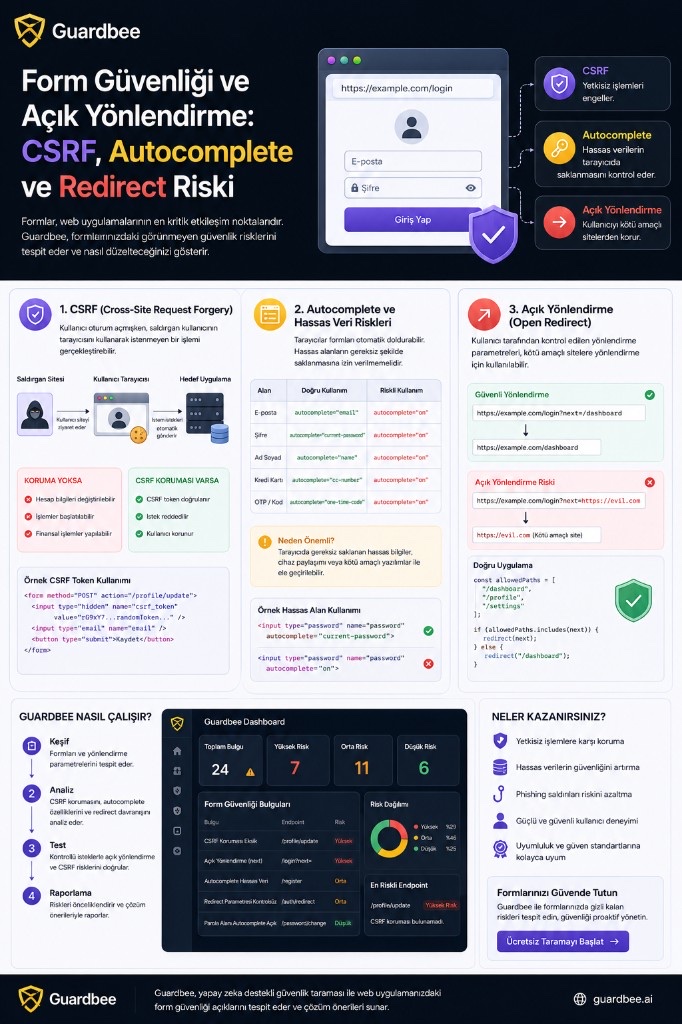
In web applications, forms power a large share of critical flows: login, registration, payments, password changes, contact, and account settings.
That means it is not enough for a form to “work.” Security also depends on who can submit it, what the browser stores, and where the user is sent afterward.
Three issues are especially easy to miss:
- CSRF (Cross-Site Request Forgery)
- Autocomplete and sensitive form fields
- Open redirects
During a web security scan, Guardbee analyzes these behaviors to make the user and product risk visible—not just emit a technical error.
Why form security matters
Consider a login form:
<form action="/login" method="POST">
    <input type="email" name="email">
    <input type="password" name="password">
    <button type="submit">Log in</button>
</form>
It looks simple. Security questions follow quickly:
Can this form be triggered from another site?
        ↓
Does the browser store sensitive data?
        ↓
Is there CSRF protection on the request?
        ↓
Where is the user sent after success?
        ↓
Can the redirect destination be changed by the user?
That is where form security starts.
1. What is CSRF?
CSRF stands for Cross-Site Request Forgery.
The core problem: while a user is logged into a site, an attacker tries to use the user’s browser to perform an unwanted action against the target application.
Suppose the user is authenticated on https://bank.example.com. An attacker may host a form like this:
<form action="https://bank.example.com/api/change-email"
      method="POST">
    <input type="hidden"
           name="email"
           value="attacker@example.com">
</form>
When the user visits the attacker’s page, the form may be submitted automatically.
If the target application skips CSRF checks and attaches authentication cookies to the request, the server may treat the request as coming from the real user.
As a result, an attacker may change account details, update addresses, start actions, modify settings, or in some cases initiate financial operations. Impact depends on what the application allows.
How CSRF tokens work
A common defense is a CSRF token:
<form method="POST">
    <input type="hidden"
           name="csrf_token"
           value="random-token">
</form>
The server associates the token with the user session:
Request
   ↓
Session
   +
CSRF Token
   ↓
Validation
   ↓
Allow / Reject
If the token is wrong, the action is rejected.
Framework-level CSRF protection, SameSite cookie policies, and a sound authentication architecture should also be evaluated together. OWASP recommends server-side CSRF token validation and CSRF defenses especially on state-changing operations.
How Guardbee analyzes CSRF
Guardbee first discovers forms and state-changing endpoints, for example:
POST /login
POST /profile/update
POST /password/change
POST /payment
Then it analyzes form structure and request behavior:
Form
 │
 ├── Method
 ├── Action
 ├── Hidden fields
 ├── CSRF token
 ├── Cookies
 └── Security attributes
If a state-changing form shows no CSRF defense signal, Guardbee may report a potential CSRF risk.
Important distinction: missing an explicit csrf_token field does not by itself prove a confirmed CSRF vulnerability. The app may use SameSite cookies, framework middleware, custom headers, or other server-side validation.
That is why Guardbee should separate passive detection from active confirmation whenever possible.
2. Autocomplete and stored form data
Browsers autofill forms to improve UX. For example:
<input
    type="email"
    name="email"
    autocomplete="email">
This can be helpful for ordinary fields. For sensitive data, configuration matters more.
For example:
<input
    type="password"
    name="password"
    autocomplete="on">
may allow the password field to be remembered or autofilled by the browser.
Using autocomplete is not a vulnerability by itself. On modern browsers, password managers and autofill behavior should be judged together for security and usability.
OWASP also recommends evaluating autocomplete controls in context and avoiding unnecessary client-side storage of sensitive information.
How Guardbee analyzes autocomplete
Guardbee inspects form fields and can extract:
Input
 │
 ├── type
 ├── name
 ├── autocomplete
 ├── sensitive-data indicator
 └── form context
Fields like these are assessed for sensitive-data context:
<input
    type="text"
    name="credit_card"
    autocomplete="on">

<input
    type="password"
    name="password"
    autocomplete="on">
Instead of only saying “an autocomplete attribute exists,” Guardbee should infer purpose. Email, password, credit card, OTP, security answer, and personal information can map to different risk categories.
3. What is an open redirect?
An open redirect lets a trusted domain send users to another address under attacker influence.
A pattern like https://example.com/login?redirect=/dashboard can be normal. If the app uses the redirect parameter without validation, an attacker can craft:
https://example.com/login?redirect=https://attacker.exampleUsers may click because they trust example.com. The app then sends them example.com → attacker.example.
This is especially useful in phishing and trusted-domain baiting. OWASP’s Unvalidated Redirects and Forwards guidance notes that unvalidated user-controlled URLs in redirects can enable phishing-style attacks.
Where open redirects appear
Not only on login pages. Common patterns include:
/login?redirect=
/logout?redirect=
/callback?returnUrl=
/auth?next=
/redirect?url=
/continue?return=
Endpoints like these deserve close review:
https://example.com/login?next=https://attacker.example
https://example.com/redirect?url=https://attacker.example
How Guardbee detects open redirects
During crawling, Guardbee analyzes URL parameters such as redirect, returnUrl, return, next, url, continue, destination, and target.
A controlled test may look like:
Normal URL
     ↓
/login?next=/dashboard
Test URL
     ↓
/login?next=https://controlled-test-domain
The response is inspected. Behavior such as:
HTTP/1.1 302 Found
Location: https://controlled-test-domain
can be flagged as a potential open redirect.
How to redirect safely
Instead of trusting user-supplied URLs directly, define allowed destinations:
const allowedPaths = [
    "/dashboard",
    "/profile",
    "/settings"
];
if (allowedPaths.includes(returnUrl)) {
    redirect(returnUrl);
}
More advanced validation can look like:
External URL
      ↓
Is domain trusted?
      ↓
Is path allowed?
      ↓
Is scheme HTTPS?
      ↓
Redirect
One of the safest approaches is to prefer relative paths or server-defined redirect IDs whenever possible.
How Guardbee’s form security scan works
At a high level:
                 Web Site
                    │
                    ▼
              Page Discovery
                    │
                    ▼
             Form Discovery
                    │
        ┌───────────┼───────────┐
        ▼           ▼           ▼
      CSRF      Autocomplete   Redirect
        │           │           │
        └───────────┼───────────┘
                    ▼
              Risk Analysis
                    │
                    ▼
             Security Finding
                    │
                    ▼
              Fix Guidance
Static HTML reading alone is not enough. Redirect issues need observed parameter behavior. CSRF needs endpoint and authentication context. Autocomplete needs the type of data accepted—not only attributes.
How Guardbee should present findings
The goal is not dumping dozens of technical details—it is helping developers understand and fix quickly.
Example:
Open Redirect Detected
Severity: Medium

Endpoint
/login?next=

Risk
The next parameter is user-controlled and the app can redirect to an external domain.

Potential Impact
Attackers can craft phishing links that abuse a trusted domain.

Recommended Fix
Do not accept external URLs directly. Allow only approved relative paths or trusted domains.
Another example:
Potential CSRF Protection Missing

Endpoint
POST /account/change-email

Risk
No visible CSRF token was detected on a state-changing form request.

Recommended Fix
Use framework CSRF protection and validate tokens server-side on state-changing requests.
Guardbee should also account for CSRF defenses implemented via frameworks or other mechanisms, and avoid treating a missing hidden input as a confirmed vulnerability by itself.
Why these checks should be evaluated together
A single check rarely explains real risk.
Open redirect + login flow + external URL can surface phishing risk. Sensitive form + autocomplete + client-side storage can better explain unnecessary client retention of user data.
On CSRF, state-changing request + cookie authentication + missing/weak CSRF defense makes the risk much clearer.
Guardbee should not only fire isolated rules—it should also evaluate relationships between findings.
Form security with Guardbee
In form security scanning, Guardbee can inspect user interaction points for CSRF protection, form security configuration, sensitive inputs, autocomplete behavior, redirect parameters, open redirects, authentication flows, and state-changing operations.
Findings can then be prioritized and presented so developers get clear answers to:
- What was found?
- Why is it risky?
- Which endpoint is affected?
- How can it be fixed?
Conclusion
Forms may look like simple UI, but they connect directly to authentication, user data, and critical actions. Form security is therefore more than input validation.
CSRF aims to stop unwanted actions through a user’s session. Autocomplete requires care in how browsers handle sensitive fields. Open redirects can turn a trusted domain into a launch pad for attacker-controlled destinations.
Guardbee evaluates these checks inside the real user flow and attack surface—not as isolated rules.
In web security, what matters is not only whether a rule was broken, but what that break can give an attacker in the real world.
Run these checks with Guardbee
Add your brand and select form security, CSRF, and open redirect modules. See findings in business language. Start with a 14-day free trial.
Frequently asked questions
Does it scan every form?
It inspects form signals on discovered pages; it does not claim full application depth coverage.
Does a missing CSRF token always mean a vulnerability?
No. SameSite cookies, framework middleware, custom headers, or other server-side validation may still apply. Guardbee aims to separate passive detection from active confirmation.
Is autocomplete always a security issue?
No. It depends on context. What matters most is how the browser handles sensitive fields.
How do you fix open redirects?
Allowlist redirect targets. Never write user input directly into Location. Prefer relative paths or server-side redirect IDs when possible.
Is this related to rate limiting?
Rate-limit signals are a separate module and complement brute-force and abuse surface coverage.