
Guide · Supply chain
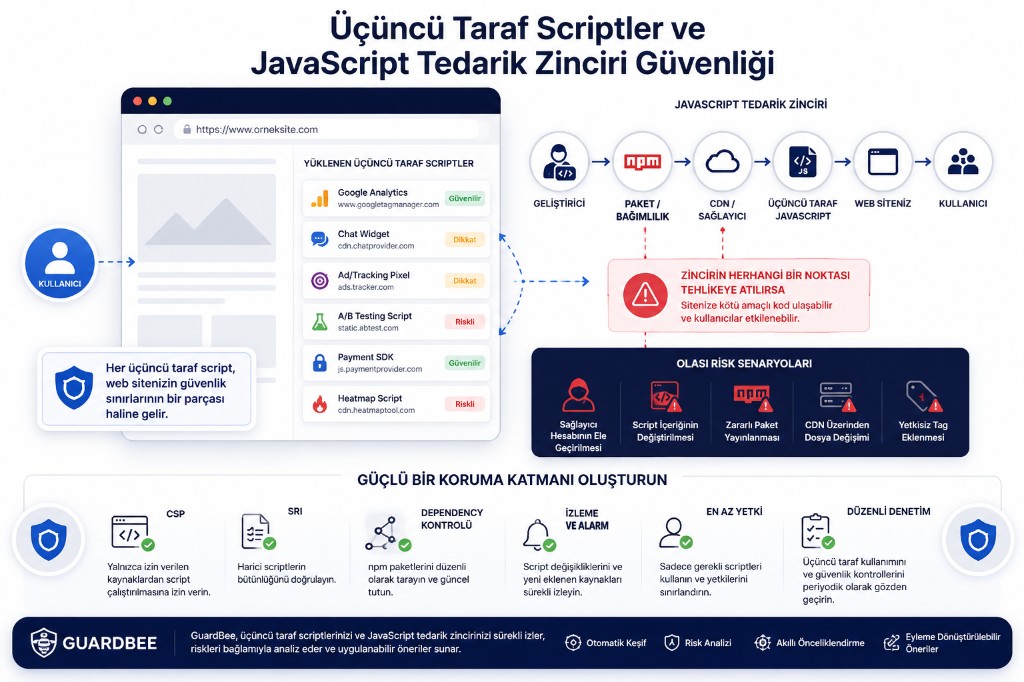
Modern websites are no longer made only of JavaScript written by your own developers.
Analytics tools, advertising platforms, live chat systems, payment services, A/B testing tools, chatbots, social integrations, tag managers, CDNs, and marketing utilities can cause dozens of third-party JavaScript files to load for a site to operate.
That speeds up product development — and creates a serious security problem:
Every third-party script you add means handing part of your security boundary to another system.
The risk does not appear only when the script is first added. A change on the vendor side, a compromised CDN account, a poisoned npm package, or a modified JavaScript file can introduce a new vulnerability without any change to your application code.
Third-party JavaScript is therefore no longer just a performance or frontend topic. It should be treated as JavaScript supply chain security.
What is the JavaScript supply chain?
The JavaScript used by a web application usually falls into three groups:
- Code written by your own developers
- Open-source dependencies you add to the project
- Third-party scripts loaded directly from external services
Imagine an ecommerce site that uses services like these:
Web Site
│
├── Google Analytics
├── Google Tag Manager
├── Meta Pixel
├── Hotjar
├── Live Chat
├── Payment SDK
├── CAPTCHA
├── A/B Testing
└── Customer Support Widget
Each of those services may be operated by a different organization.
The key security point is this:
Your site’s security does not depend only on the safety of the JavaScript you wrote yourself.
Third-party code is also part of your application’s attack surface.
What is a third-party script?
A third-party script is JavaScript that runs in the browser but is not directly managed inside your own server or application codebase.
For example:
<script src="https://example-analytics.com/tracker.js"></script>or:
<script src="https://cdn.example.com/widget.js"></script>Scripts loaded dynamically through systems such as Google Tag Manager also fall into this category.
These systems are useful. The critical caveat is:
JavaScript running in the browser is not limited to “collecting statistics.”
Depending on its privileges, it can access the DOM, observe user interactions, make network requests, and in some cases read sensitive information on the page.
Calling a script “analytics,” “marketing,” or “support” does not make it safe by itself.
Why is third-party JavaScript a security risk?
When you add JavaScript to a page, the browser can execute it as if it were part of your site.
<script src="https://third-party.example/script.js"></script>The user may be visiting example.com, while the JavaScript comes from third-party.example. External code has entered your site’s runtime.
That creates a security trust boundary.
User
   ↓
Your Website
   ↓
Third-Party Script
   ↓
External System
If the third-party system is compromised, your application can be affected too.
What is a JavaScript supply chain attack?
A JavaScript supply chain attack targets a dependency, package, CDN, or third-party script provider your application trusts — instead of attacking your own code directly.
An attacker may compromise any point in this chain:
Developer
   ↓
npm package
   ↓
Build system
   ↓
CDN
   ↓
Third-party JavaScript
   ↓
Your Website
   ↓
User
That approach is attractive to attackers: compromising one provider can affect hundreds or thousands of sites that load the same script.
Why does later modification of a script matter?
One of the biggest risks is that a script can change over time.
Today your site may include:
<script src="https://cdn.example.com/widget.js"></script>That file may be safe today. Tomorrow, widget.js can be changed.
The change may never appear in your Git repository. You do not need to deploy. You do not need to edit your application. The next day, browsers may execute the new JavaScript for every visitor.
That is one of the core problems of JavaScript supply chain security.
Using a CDN does not mean it is secure
CDNs are common in modern web apps.
<script src="https://cdn.example.com/library.min.js"></script>That can be sensible for performance. From a security perspective you still need answers to:
- Who controls the file contents?
- Can the file be changed?
- How is the CDN account protected?
- How is file integrity verified?
- Which domains load the script?
- Does the script source change over time?
- How much privilege does the script have?
- Is the script still necessary?
The core issue: an unchanged URL does not mean an unchanged file.
What is Subresource Integrity (SRI)?
One mechanism for verifying the integrity of third-party JavaScript is Subresource Integrity (SRI).
<script
  src="https://cdn.example.com/library.js"
  integrity="sha384-..."
  crossorigin="anonymous">
</script>
The integrity value is a cryptographic hash of the expected file contents. When the browser downloads the file, it checks the hash. If the file was changed, the hashes do not match and the browser refuses to run the script.
Expected file
      ↓
   SHA-384
      ↓
Expected hash

Downloaded file
      ↓
   SHA-384
      ↓
Actual hash
       ↓
Compare
       ↓
  Match?
   /       \
 Yes        No
  ↓          ↓
Run        Block
SRI is especially useful for static third-party assets whose hashes you can control. It is harder to apply when a provider intentionally serves dynamic script content.
SRI alone is not a complete solution.
Why Content Security Policy (CSP) matters
Another important control for third-party JavaScript security is Content Security Policy (CSP).
Content-Security-Policy:
  script-src 'self' https://trusted.example.com;
CSP tells the browser which sources are allowed to run JavaScript, so your app can be limited to your own domain plus trusted third parties.
CSP is not only about third-party scripts. It can also reduce the impact of some XSS attacks.
Misconfigured CSP can create a false sense of safety. A policy like script-src * does not provide meaningful restriction. Presence of CSP matters less than how it is configured.
Why Google Tag Manager needs separate attention
Tag management systems are useful for marketing and product teams. Without a developer deployment for every change, you can add analytics, conversion tracking, advertising pixels, A/B testing, heatmaps, and marketing integrations.
The security consequence: what runs in production can change outside your normal release process.
Developer
    ↓
Tag Manager
    ↓
Multiple Scripts
    ↓
Browser
That makes Tag Manager access control, user privileges, and regular review of installed tags essential.
npm dependencies are part of the supply chain too
Risk is not limited to JavaScript loaded from a CDN. In modern frontend projects, packages added with npm install package-name are also a major part of the JavaScript supply chain.
Your Application
       ↓
React / Angular / Vue
       ↓
Package A
       ↓
Package B
       ↓
Package C
A package does not need to be malicious itself. A lower-level package in the dependency tree can still create risk. That is why direct dependencies and transitive dependencies both matter.
How can an npm package be compromised?
An attacker’s target may not be your application at all.
Popular Package
      ↓
Maintainer Account
      ↓
Package Registry
      ↓
Malicious Version
      ↓
Developers
      ↓
Production Applications
An attacker can publish a new package version, get it into CI/CD, and reach production applications with malicious code.
Dependency management is therefore more than asking “is the package up to date?”
What is typosquatting?
Typosquatting is a common supply-chain technique. An attacker publishes a fake package whose name closely resembles a popular one.
For example, popular-package versus popular_packge or popular-package-js. If a developer installs the wrong package, malicious code can enter the application.
Adding a new dependency should not be treated as a casual npm install.
Can third-party scripts access user data?
It depends on the context and privileges of the script. Browser JavaScript can interact with the DOM — for example via document.querySelector(...).
Form fields, user interactions, and on-page data can therefore become relevant to third-party scripts. Extra care is needed on:
- Login pages
- Checkout pages
- User profiles
- Payment screens
- Screens with health information
- Enterprise dashboards
- Forms that collect personal data
This is not only a technical security issue — privacy is involved too.
Why third-party scripts matter for privacy (including KVKK)
If a script sends user behavior or personal data to a third-party service, the topic is no longer frontend security alone.
User
 ↓
Website
 ↓
Analytics Script
 ↓
Third-party service
Organizations should ask not only “Is this script safe?” but also “What data does it collect, where does it send it, and why?”
Under Turkey’s KVKK — and under GDPR-style privacy regimes more broadly — third-party services that process personal data need separate evaluation.
An important distinction: a scanner detecting a script does not by itself mean a privacy violation. What the script does, which data it processes, the legal basis, transfer mechanisms, and related processing activities must still be assessed. That distinction is critical for reducing false positives.
Common mistakes in third-party script security
1. Not removing unused scripts
Sites grow over time. Chat widgets, analytics, A/B testing, marketing pixels, or heatmaps may stop being used — while the script remains in HTML and keeps expanding attack surface.
2. Treating every script as trusted
Even scripts from Google, Microsoft, or Cloudflare are not automatically risk-free. The goal is not distrust for its own sake — it is measuring risk technically.
3. Not using CSP
Without CSP, controlling JavaScript sources is harder. On sites with many third-party integrations, CSP is an important defense layer.
4. Not using SRI
For static third-party assets, SRI can be an important integrity control.
5. Not updating old dependencies
Old packages may contain known vulnerabilities. Large dependency trees need regular audits.
6. Running scripts everywhere in production
Not every script needs to run on every page. Analytics may run site-wide, chat on selected pages, payment SDKs on checkout, admin tools only in admin panels. Scoping reduces attack surface.
JavaScript supply chain security checklist
If your site uses third-party JavaScript, review these regularly:
Source control
- Which third-party scripts load?
- Which domains do they come from?
- Who are the providers?
- Are unused scripts still present?
Integrity
- Is SRI used?
- Can changes to external script content be detected?
- Are CDN sources reviewed?
CSP
- Is Content Security Policy present?
- Is script-src overly broad?
- Are untrusted domains allowed?
- Is inline script use controlled?
Dependency security
- Are npm/yarn/pnpm dependencies current?
- Are known CVEs present?
- Are transitive dependencies reviewed?
- Is a lock file used?
Access control
- Who can access Tag Manager accounts?
- Is MFA enabled on third-party service accounts?
- Have unnecessary users been removed?
Privacy
- What data does the script collect?
- Where is data sent?
- Is user consent required?
- Does it align with privacy/consent mechanisms?
Why GuardBee cares about third-party JavaScript risk
A common failure in web security is reporting findings only in technical jargon. “Missing SRI” alone may mean little to a manager. The real question is: What does this mean for the business?
GuardBee focuses on translating technical findings into business context. A JavaScript surface review can follow:
Third-party Scripts
       ↓
Script Sources
       ↓
Security Headers
       ↓
Integrity Controls
       ↓
Potential Risk
       ↓
Recommended Action
Saying only “An external JavaScript source is used” is not enough. A better explanation is:
Your website depends on a third-party JavaScript source. There is no SRI mechanism verifying that source’s integrity. An unauthorized change on the provider side could affect the JavaScript that runs on your site.
Both statements point to a similar technical issue; the second explains why the risk matters.
Not every third-party script is a vulnerability
Google Analytics, Meta Pixel, Hotjar, Cloudflare, Stripe, or Intercom on a site does not automatically mean a security vulnerability.
Likewise, “There are 20 third-party scripts on the site” is not a meaningful finding by itself.
What should be evaluated:
Is there a script?
       ↓
Is the source trustworthy?
       ↓
What privileges does it have?
       ↓
What data can it access?
       ↓
Is integrity protected?
       ↓
Is it constrained by CSP?
       ↓
Is it unnecessary?
       ↓
Does it create real risk?
That approach is critical for reducing false positives in security scanners.
How to improve third-party JavaScript security
The best approach is layered controls rather than relying on a single mechanism.
              Web Application
                     │
          ┌──────────┴──────────┐
          │                     │
         CSP                   SRI
          │                     │
          └──────────┬──────────┘
                     │
             Third-party JS
                     │
          ┌──────────┴──────────┐
          │                     │
     Dependency Audit      Monitoring
          │                     │
          └──────────┬──────────┘
                     │
               Risk Detection
If one control fails, the others can still reduce risk.
Conclusion
JavaScript is a foundation of modern web applications. As apps grow, the boundary between your code and third-party code keeps expanding.
An analytics script, ad pixel, chatbot, payment SDK, or npm package may look like a small integration. Each one is part of your JavaScript supply chain.
Securing a web application means asking more than “Do we have vulnerabilities in our own code?” You also need regular answers to:
- Which third-party code do we trust?
- Can we detect when that code changes?
- What data can it access?
- How do we verify sources and integrity?
- Are they constrained by CSP?
- Do we still need these scripts?
JavaScript supply chain security is not a one-time check. It is an ongoing security process.
The value of a platform like GuardBee is not only counting scripts on a site — it is distinguishing which components matter for security, showing risk in context, and offering actionable remediation.
Run these checks with GuardBee
Add your brand, select Third-Party Scripts and JS Supply Chain modules, and see findings in business language. Start with a 14-day free trial.
Frequently asked questions
What is third-party JavaScript?
JavaScript loaded from an external provider outside your own codebase and executed in the browser. Analytics, advertising, chatbots, payments, and A/B testing tools are common examples.
Are third-party scripts safe?
Not every third-party script is a vulnerability. Because external code runs in your site context, it creates an additional trust boundary and should be reviewed regularly.
What is SRI?
Subresource Integrity lets the browser verify that an external JavaScript or CSS file matches the expected content using a cryptographic hash.
Does CSP block third-party scripts?
CSP can control which sources are allowed to run scripts. How CSP is configured matters — overly broad policies reduce the security benefit.
Are npm packages part of the JavaScript supply chain?
Yes. Direct and transitive npm dependencies are an important part of an application’s JavaScript supply chain.
Do third-party scripts create privacy / KVKK risk?
They can. Using a third-party script alone does not automatically mean a privacy violation. What data is collected, where it is sent, and the related processing conditions still need assessment.
Is having many third-party scripts a vulnerability?
Not by itself. What matters is source, behavior, accessible data, security controls, and whether each script is still necessary.